Remove Wrinkles From Clothes in Product Photos
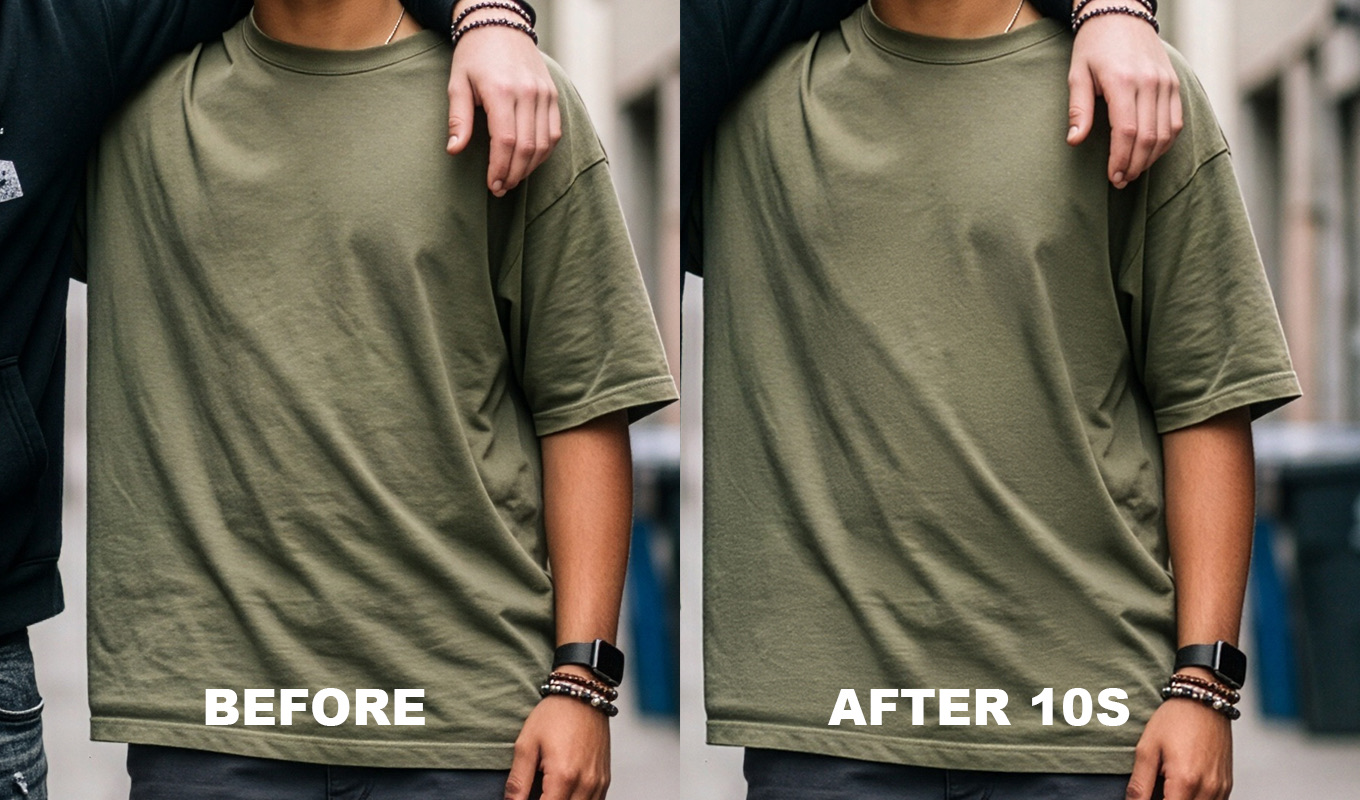
A buyer cannot touch the fabric, so the photo does the job of the hand. A wrinkled shirt on a white background looks worn or cheap, even when it is new. A smooth one with real fabric texture looks cared for. That difference matters whether you run a clothing shop, sell handmade pieces on Etsy, or clear your wardrobe on Vinted or Depop.
This guide covers garment retouching for product photos: what to do before you shoot, how to remove wrinkles from clothes in Photoshop by hand, how to keep a whole catalog consistent, and when Photoshop is honestly the wrong tool because you have too many photos. For the general method on any photo, start with the main guide: how to remove wrinkles from clothes in Photoshop.
Steam First, Edit Second
Every wrinkle you remove with a steamer is one you do not have to retouch. Retouching a garment that was never steamed takes much longer and looks worse, because big folds bend the light and the print with them.
- Steam on the hanger, top to bottom, then let it cool for a few minutes before you shoot. Warm fabric creases again when you handle it.
- Lint roll dark fabrics. Dust and fluff are slower to retouch than creases.
- Stuff with tissue paper inside sleeves and the body for flat lays, so the garment has a little volume and no sharp fold lines.
- Pin or clip at the back on a mannequin so the front sits clean, and keep the clips out of frame.
Flat Lay, Hanger or Ghost Mannequin
Each setup makes its own kind of wrinkle, and each needs a slightly different fix.
- Flat lay: straight fold lines from storage and ripples where the fabric does not lie flat. Smooth from the centre outwards with your hands before shooting. In editing, the fold lines are healing work, the ripples are smoothing work.
- Hanger: bumps at the shoulders from the hanger ends and diagonal pull lines from the weight of the garment. A wider hanger helps. In editing, soften the pulls but keep the shoulder line.
- Ghost mannequin: pull lines around the clips, a join where the inside neck shot is placed, and folds at the armholes. The clip lines are the most common thing to fix.
How to Remove Wrinkles in Photoshop
This is the manual garment retouching workflow. It works in any recent version of Photoshop and costs nothing extra.
- Duplicate the layer. Cmd/Ctrl+J. Keep the original underneath to compare.
- Heal small creases. Spot Healing Brush (J), Content-Aware, a brush just wider than the crease, one stroke along it.
- Patch medium creases on plain fabric. Draw around the fold with the Patch Tool and drag it to a clean area with the same light. Do this only on plain areas, never across a print.
- Smooth large ripples with frequency separation. Split the image into a tone layer and a texture layer, smooth only the tone, and the weave stays. Fabric needs a far bigger blur radius than skin. Full steps: frequency separation for clothes.
- Clone along seams and hems. The Clone Stamp (S) at partial opacity, sampled along the same seam, keeps stitching straight where the healing tools would smear it.
- Check the colour. Toggle your layer on and off. If the garment shifted colour, your edit is too strong in that area. Buyers return items that do not match the photo.
Iron Pro: the wrinkle remover for Photoshop
One click builds the setup, then you paint over the wrinkles. Clothes and backdrops smooth out, the fabric keeps its texture, and every slider stays adjustable.
GET IRON PRO →“I used to spend so much time fixing little wrinkles in clothes. Now I can focus on making my photos beautiful instead of worrying about every tiny crease.”
“I'm a photographer, not a dry cleaner! I swear every photoshoot has at least one wrinkled shirt, dress or pair of trousers. This tool will save me in fashion weeks for suuure!”
“Wedding dresses are beautiful, but after hours of walking, sitting, hugging and dancing, they can become a retouching nightmare. This has made my workflow so much easier.”
“I swear clothes always look more wrinkled in photos than they do in real life. A few brush strokes and the clothes look so much better!”
“I used to spend so much time fixing little wrinkles in clothes. Now I can focus on making my photos beautiful instead of worrying about every tiny crease.”
“I'm a photographer, not a dry cleaner! I swear every photoshoot has at least one wrinkled shirt, dress or pair of trousers. This tool will save me in fashion weeks for suuure!”
“Wedding dresses are beautiful, but after hours of walking, sitting, hugging and dancing, they can become a retouching nightmare. This has made my workflow so much easier.”
“I swear clothes always look more wrinkled in photos than they do in real life. A few brush strokes and the clothes look so much better!”
The Faster Way: Iron Pro
I make Iron Pro, a Photoshop plugin for exactly this job. It is not AI and nothing is uploaded: it builds a filter and layer setup on your computer and works offline. Save a copy first, because it flattens the document and converts it to 8-bit if needed.
- Set the Blur Radius before you start. Default is 20 px. Larger folds want more.
- Press RUN IRON. A Zone 1 group appears with a black mask.
- Paint white on the mask over the wrinkles. Press X to paint black and take it back. Brush size with [ and ].
- Adjust Smoothing, New Texture and Fabric Detail live until the fabric looks flat but still real.
- If the backdrop or sweep is creased too, press + NEW ZONE and use a larger radius there, for example 20 for the garment and 60 for the backdrop.
Keep the brush off prints, logos, lace and sheer fabric. Smoothing blurs the pattern. For those areas use the Clone Stamp, or leave them as they are.
A Consistent Look Across the Catalog
Shoppers scroll a grid, not one photo. If one shirt is perfectly smooth and the next is creased, the whole shop looks uneven. Consistency is mostly decided before you edit:
- Same light and same background for every item in a collection.
- Same crop and same angle. Write down your camera height and distance.
- Same retouch level. Decide what you fix (creases, lint, clip lines) and what you leave (natural drape, seams, real texture), and apply it to every item.
- Same numbers. Keep a note of the Blur Radius and slider values that worked per fabric type, cotton, linen, knit, denim, and reuse them.
- Colour checked against the real garment on a calibrated screen, in daylight if you can.
When Photoshop Is the Wrong Tool
Honest part. Iron Pro and the manual method work one photo at a time. Iron Pro is not a batch tool. For a few hero shots, a small handmade collection or a weekly drop, that is fine. For hundreds of SKUs a week, it is not the right fit, and I would rather say so.
- Editing services charge about $1 per image. At high volume this is usually the cheapest option for your time.
- Freelancers on Fiverr charge roughly $50 to $100 per job, which suits a one off batch.
- Phone and web AI apps such as Photoroom (its Ironing tool is in the paid Pro tiers) or Pixelcut cost around $10 a month or a few cents per photo. One tap, little control over texture. For Vinted and Depop listings shot on a phone, this is often the most practical choice.
Prices checked November 2026, check current. The trade offs between AI apps and doing it in Photoshop are in AI clothes wrinkle remover vs Photoshop, and a ranked list of the plugins is in best wrinkle remover plugins for Photoshop.
Second Hand: Smooth, Don't Hide
On resale apps, removing wrinkles is fair: a crease is temporary and the buyer will wash or steam the item anyway. Hiding damage is not. Leave stains, pilling, holes and fading visible, and photograph them up close if they exist. A buyer who gets what the photo showed leaves a good review. One who does not opens a dispute.
If you edit in Lightroom only, you can soften creases there with masks, but larger folds need layers. Here is what is possible: removing wrinkles from clothes in Lightroom.
Iron Pro: the wrinkle remover for Photoshop
One click builds the setup, then you paint over the wrinkles. Clothes and backdrops smooth out, the fabric keeps its texture, and every slider stays adjustable.
GET IRON PRO →Steam well, shoot every item the same way, retouch only what a steamer could have fixed, and pick the tool that matches your volume. That is the whole system.
Frequently Asked Questions
How do you remove wrinkles from clothes in product photos?
Steam the garment first, then in Photoshop heal small creases with the Spot Healing Brush, patch medium ones from clean fabric, smooth large ripples with frequency separation, and clone along seams. Check the colour has not shifted before you export.
How do I get wrinkles out of a flat lay photo?
Before shooting, steam the item, stuff it with tissue paper and smooth it from the centre outwards by hand. After shooting, heal the straight fold lines and smooth the remaining ripples on a separate layer.
What is the fastest way to edit many clothing photos?
Shoot every item with the same light, background and crop so the edits stay small. For hundreds of items a week, an editing service at about $1 per image or an AI app is faster than retouching each photo in Photoshop.
Can I remove wrinkles from clothes on my phone for Vinted or Depop?
Yes. Apps like Photoroom have an ironing tool in their paid tiers, and other AI apps cost around $10 a month. They are quick, but they give little control over texture, and you should never use them to hide damage.
Is it okay to remove wrinkles from second hand clothes photos?
Removing wrinkles is fair because they are temporary. Hiding stains, pilling, holes or fading is not, and buyers can dispute an item that does not match the photo.