Best Wrinkle Remover Plugins for Photoshop
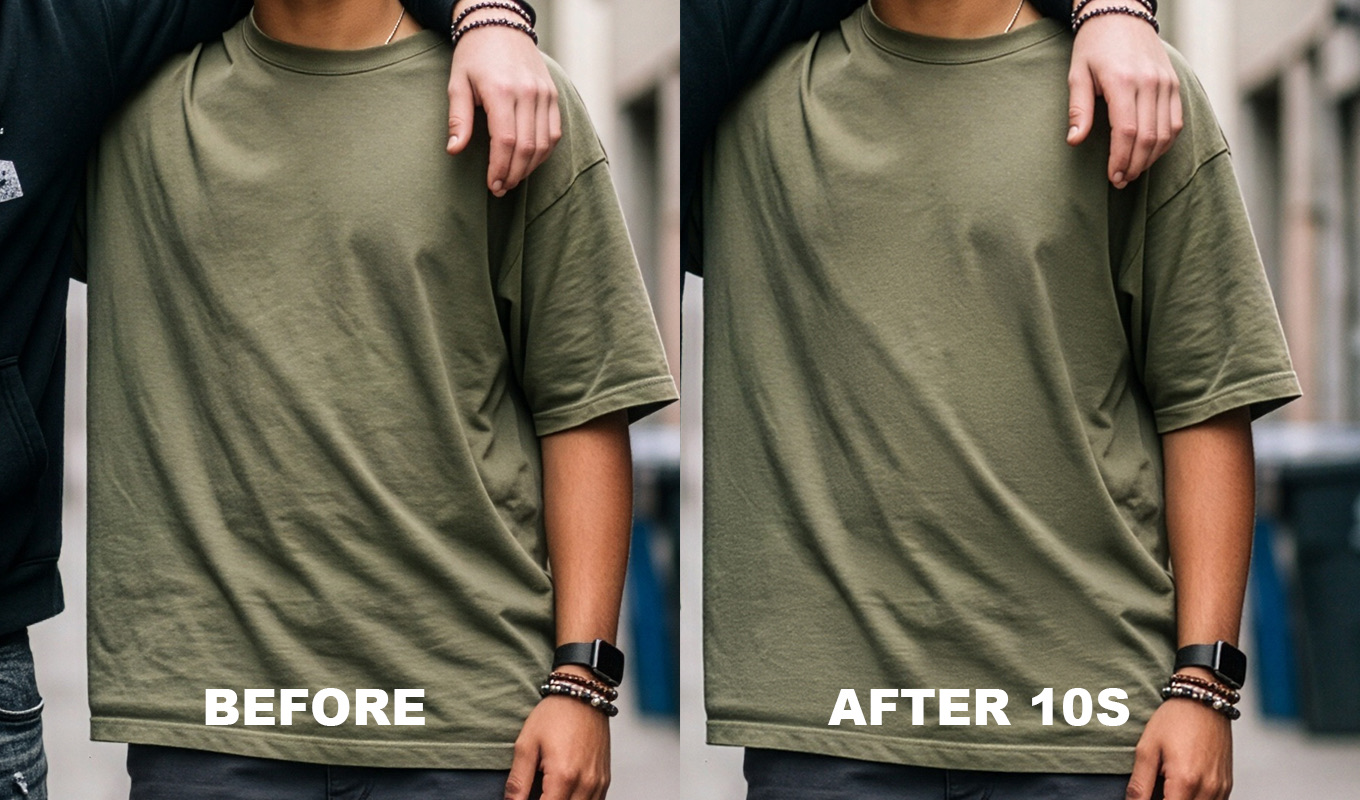
A wrinkle remover in Photoshop, in this post, means clothes and backdrops, not skin. There are only a handful of real options: a few dedicated plugins, one AI editor that sits outside Photoshop, the built-in tools with a frequency separation action, and Generative Fill. Here they are ranked, with honest pros, cons and prices.
Disclosure first: I make Iron Pro, so weigh that. It sits at number one on my list because it does what I wanted for my own portraits. I have tried to be fair to the others, and for some jobs they are the better pick. If you would rather learn the method without buying anything, start with the main guide: how to remove wrinkles from clothes in Photoshop.
What I Looked At
- Control: can you choose exactly where it smooths, and how much?
- Texture: does the fabric still look like fabric afterwards?
- Privacy: does it run on your computer, or upload the photo?
- Price model: one-time, subscription or pay per photo.
- Speed and volume: one photo at a time, or many.
The Ranking, November 2026
Brush-based Photoshop plugin from the makers of RetouchLab Skin Pro, same engine tuned for fabric. Not AI: it builds a Median smoothing layer, a High Pass fabric detail layer and a fine texture layer, then you paint white on a mask over the wrinkles. Pros: full control, live sliders, + NEW ZONE for clothes and backdrop at different radii, works offline, nothing uploaded. Cons: one photo at a time, not batch; it flattens and converts to 8-bit; keep the brush off prints, lace and logos. Pictures, the screen recording and requirements: the Iron Pro page.
AI plugin for clothing wrinkles that runs on your computer. It is often discounted, so check the current price. Pros: fully automatic, fast, local, one-time price. Cons: less say over where it works, so you may need to mask the result back on areas you wanted to keep, and as with any AI it can change detail.
The same idea for backgrounds: AI, local, automatic cleanup of wrinkled and dirty backdrops. Pros: very fast on studio backdrops. Cons: backdrops only, not clothes, and a separate purchase from Fabric. If you want a brush instead of automatic, we also make Backdrop Pro, a separate plugin just for backdrops (ours too, not AI).
AI editor with clothing wrinkle removal among many retouching features. You pay per exported photo, about 0.05 to 0.09 EUR per credit on annual plans on the page I saw (shown in euros for me). Pros: strong for high volume, batch friendly. Cons: a standalone editor rather than a Photoshop panel, and costs grow with every export.
Spot Healing Brush, Patch Tool, Clone Stamp and frequency separation, set up by hand or with a recorded action. Pros: free with Photoshop, nothing invented, total control. Cons: slow, and the result depends on skill.
Built in. Select a crease, generate, pick a variation. Pros: quick for one small area on plain fabric. Cons: it can invent fabric that changes the garment, results vary each run, and it runs on Adobe's servers.
Prices checked November 2026, check current.
| TOOL | AI? | RUNS | CLOTHES / BACKDROP |
|---|---|---|---|
| Iron Pro | No | Your computer, offline | Both |
| Retouch4me Fabric | Yes | Your computer | Clothes |
| Retouch4me Clean Backdrop | Yes | Your computer | Backdrop |
| Evoto | Yes | Separate editor | Clothes |
| Built-in tools + actions | No | Photoshop | Both |
| Generative Fill | Yes | Adobe servers | Small areas |
Iron Pro: the wrinkle remover for Photoshop
One click builds the setup, then you paint over the wrinkles. Clothes and backdrops smooth out, the fabric keeps its texture, and every slider stays adjustable.
GET IRON PRO →“I used to spend so much time fixing little wrinkles in clothes. Now I can focus on making my photos beautiful instead of worrying about every tiny crease.”
“I'm a photographer, not a dry cleaner! I swear every photoshoot has at least one wrinkled shirt, dress or pair of trousers. This tool will save me in fashion weeks for suuure!”
“Wedding dresses are beautiful, but after hours of walking, sitting, hugging and dancing, they can become a retouching nightmare. This has made my workflow so much easier.”
“I swear clothes always look more wrinkled in photos than they do in real life. A few brush strokes and the clothes look so much better!”
“I used to spend so much time fixing little wrinkles in clothes. Now I can focus on making my photos beautiful instead of worrying about every tiny crease.”
“I'm a photographer, not a dry cleaner! I swear every photoshoot has at least one wrinkled shirt, dress or pair of trousers. This tool will save me in fashion weeks for suuure!”
“Wedding dresses are beautiful, but after hours of walking, sitting, hugging and dancing, they can become a retouching nightmare. This has made my workflow so much easier.”
“I swear clothes always look more wrinkled in photos than they do in real life. A few brush strokes and the clothes look so much better!”
A Retouch4me Fabric Alternative
Retouch4me Fabric is a good tool. If you want a fully automatic result and you shoot plain garments, it may be exactly what you need. People look for an alternative for a few reasons:
- They want to choose where it smooths. On a portrait, you often want the shirt smoothed but the jacket lapel and a tie left alone.
- They want clothes and backdrop in one tool instead of two separate purchases.
- They prefer no AI, so nothing in the fabric is redrawn.
- Price model. Some prefer a monthly plan, some a one-time buy.
The alternatives, honestly:
- Iron Pro (ours). Brush and mask control, clothes and backdrop with separate zones, not AI, lifetime or monthly.
- Evoto, if you already edit there and work at volume.
- Manual frequency separation, if you have more time than budget. Steps for fabric: frequency separation for clothes.
- Generative Fill, for the occasional small crease.
Backdrops are their own job with bigger folds and bigger radii. The method is in how to remove wrinkles from a backdrop in Photoshop.
Is There a Remove Wrinkles Photoshop Action?
Yes, in the sense that frequency separation actions exist, and many are free. An action only builds the layers. You still do the smoothing by hand. You can record your own in a couple of minutes:
- Open Window > Actions and click Create New Action. Name it Fabric FS 8-bit.
- Duplicate the layer twice (Cmd/Ctrl+J) and name the copies Low and High.
- On Low, run Filter > Noise > Median or Gaussian Blur. In the Actions panel, turn on the dialog toggle next to that step later, so it asks you for the radius each time.
- On High, run Image > Apply Image: Layer Low, Subtract, Scale 2, Offset 128 for 8-bit files.
- Set High to Linear Light and press Stop.
Record a second action for 16-bit files with Invert on, Add, Scale 2, Offset 0. If you download a ready made action, take it from a source you trust, and check the blur radius: most free actions are made for skin, which needs a much smaller radius than fabric.
What None of Them Do
Whichever tool you pick, a few jobs stay manual. No plugin rebuilds fabric that is not in the frame, like a collar folded under or a hem cut off by the crop. Hard structural folds, pleats and the roll of a lapel are part of the garment, and smoothing them makes it look wrong; leave them, or fix them with the Clone Stamp and Patch Tool. Lace, sheer fabric, heavy prints and logos need careful cloning, because both smoothing filters and AI blur or redraw the pattern. And a steamer before the shoot still beats every tool on this list.
Which One Should You Pick?
- Portraits, headshots, weddings, where you want control: Iron Pro, or manual frequency separation. For shirts and suits in headshots: fixing a wrinkled shirt in a headshot.
- Plain garments, fully automatic, one-time price: Retouch4me Fabric.
- Studio backdrops only: Backdrop Pro (ours, a brush) or Retouch4me Clean Backdrop (automatic). Iron Pro also handles a backdrop with + NEW ZONE if you already own it.
- High volume, batch: Evoto, or an editing service.
- Lace and delicate dresses: careful manual work, whatever plugin you own. See removing wrinkles from a wedding dress.
- One crease, right now: Spot Healing or Generative Fill.
If you are deciding between AI and doing it yourself in general, the longer comparison is here: AI clothes wrinkle remover vs Photoshop.
Iron Pro: the wrinkle remover for Photoshop
One click builds the setup, then you paint over the wrinkles. Clothes and backdrops smooth out, the fabric keeps its texture, and every slider stays adjustable.
GET IRON PRO →Every tool on this list removes wrinkles. The difference is who decides where: the software, or you. Pick the one that matches how much control your photos need and how many of them you edit.
Frequently Asked Questions
Is there a wrinkle remover in Photoshop?
Photoshop has no single wrinkle remover button, but the Spot Healing Brush, Patch Tool, Clone Stamp, frequency separation and Generative Fill all remove fabric wrinkles. Plugins such as Iron Pro and Retouch4me Fabric make it faster.
What is a good Retouch4me Fabric alternative?
Iron Pro if you want to paint exactly where the smoothing goes without AI, Evoto if you work at high volume, manual frequency separation if you want a free method, and Generative Fill for small areas.
Is there a Photoshop action to remove wrinkles from clothes?
Frequency separation actions build the layers for you, and you can record your own in a few minutes. You still smooth the wrinkles by hand, and fabric needs a much bigger blur radius than most skin actions use.
How much does Retouch4me Fabric cost?
Its page showed $145 with a sale price of $94.25 when checked in November 2026. Retouch4me Clean Backdrop showed $179, on sale for $116.35. Check the current price on their site.
Which wrinkle remover plugins do not use AI?
Iron Pro is filter and layer based and works offline. Photoshop's own Spot Healing, Patch, Clone and frequency separation are also not generative. Retouch4me, Evoto and Generative Fill are AI based.