How to Remove Wrinkles from a Wedding Dress in Photoshop
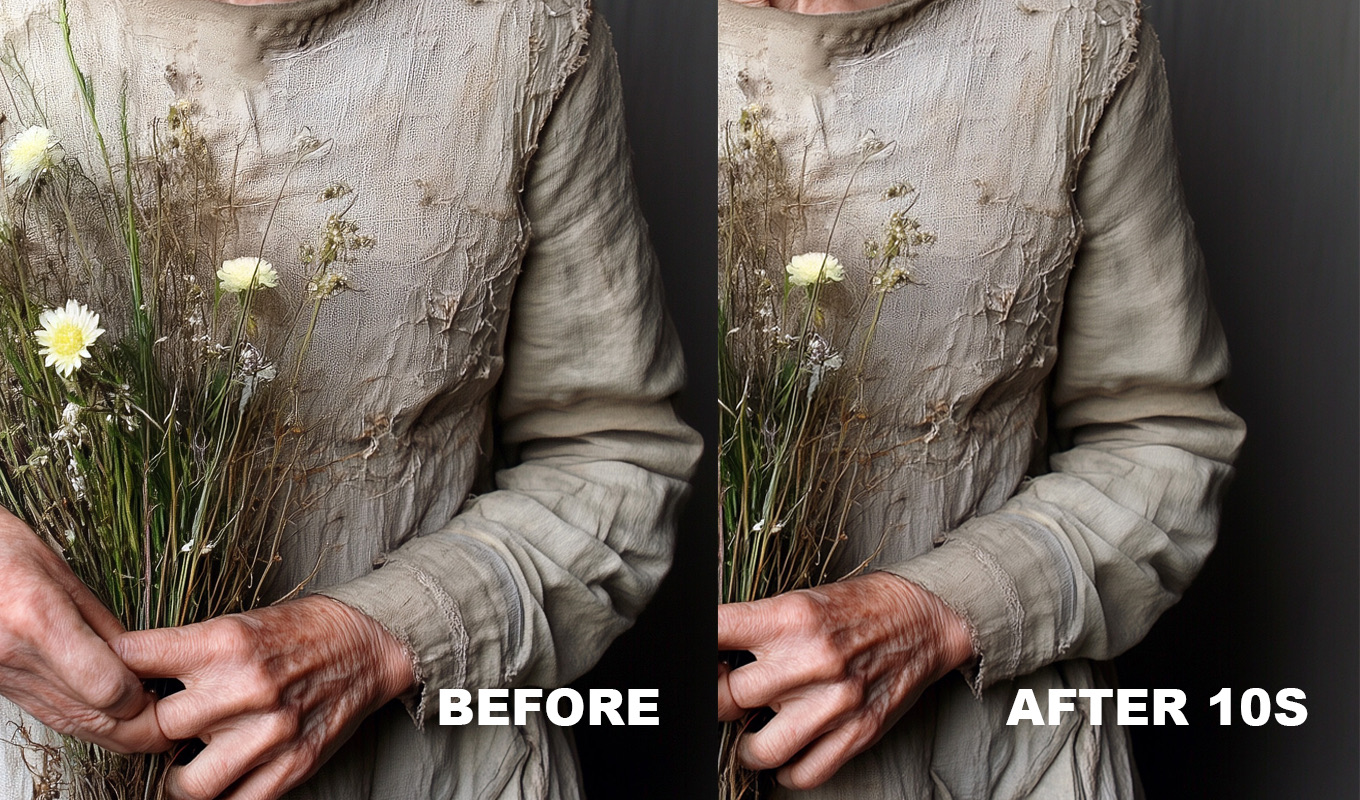
Wedding dresses wrinkle all day. They travel in a bag, the bride sits in the car, sits at dinner, and by the evening portraits the bodice has creases and the skirt has a crushed line across it. Dresses are also the hardest garment to fix, because they mix fabrics that need opposite treatment: smooth satin, see-through tulle and patterned lace, sometimes all in one dress.
Here is how I remove wrinkles from a dress in Photoshop fabric by fabric, and what to leave alone. The four general methods are compared in how to remove wrinkles from clothes in Photoshop.
Keep the Dress Shape
Before any fix, separate design from damage. The designer put some folds there on purpose.
- Keep: pleats, gathers, draping, the folds that show the volume of the skirt, corset boning lines, seams and the line of the waist.
- Remove: horizontal creases from sitting, crushed lines from the garment bag, small ripples on the bodice, a fold in the train where someone stepped on it.
If you are not sure, look at a photo from the morning, before the ceremony. Folds that are in both photos are usually design. Folds that appeared later are wrinkles.
Satin: Keep the Highlights
Satin is all about sheen. The soft bright highlights that run along the fabric are what make it look expensive. The trap: those highlights are made of the same light and shadow as the wrinkles. Smooth too much and the satin turns into flat matte fabric.
- Use frequency separation. Blur a copy (Low) until the fine detail is gone, build the detail layer (High) with Image > Apply Image and set it to Linear Light. Satin has very little weave, so a small blur radius is often enough for Low.
- On Low, work along the direction of the sheen, never across it. Select a creased patch with a feathered Lasso and blur it, or use the Mixer Brush and stroke in the same direction as the highlight.
- Leave the main highlight stripes in place. Remove the small sharp highlights that sit on top of each crease, those are the wrinkles.
- Compare at fit to screen. The dress should still shine.
The fabric settings in more detail are in frequency separation for clothes.
Iron Pro: the wrinkle remover for Photoshop
One click builds the setup, then you paint over the wrinkles. Clothes and backdrops smooth out, the fabric keeps its texture, and every slider stays adjustable.
GET IRON PRO →“I used to spend so much time fixing little wrinkles in clothes. Now I can focus on making my photos beautiful instead of worrying about every tiny crease.”
“I'm a photographer, not a dry cleaner! I swear every photoshoot has at least one wrinkled shirt, dress or pair of trousers. This tool will save me in fashion weeks for suuure!”
“Wedding dresses are beautiful, but after hours of walking, sitting, hugging and dancing, they can become a retouching nightmare. This has made my workflow so much easier.”
“I swear clothes always look more wrinkled in photos than they do in real life. A few brush strokes and the clothes look so much better!”
“I used to spend so much time fixing little wrinkles in clothes. Now I can focus on making my photos beautiful instead of worrying about every tiny crease.”
“I'm a photographer, not a dry cleaner! I swear every photoshoot has at least one wrinkled shirt, dress or pair of trousers. This tool will save me in fashion weeks for suuure!”
“Wedding dresses are beautiful, but after hours of walking, sitting, hugging and dancing, they can become a retouching nightmare. This has made my workflow so much easier.”
“I swear clothes always look more wrinkled in photos than they do in real life. A few brush strokes and the clothes look so much better!”
Tulle and Lace: Do Not Blur
This is the most important rule in this post. Tulle and lace are patterns, and any blur, from a filter, a smoothing tool or a plugin, turns the pattern into mush.
- Lace: use the Clone Stamp (S) with Aligned on, sampling the same motif of the lace next to the crease. Match the repeat of the pattern exactly. Slow, but it is the only way that holds up at 100%.
- Tulle: tulle is layered and partly see-through, so folds in it are normal and usually look fine. If one fold is too strong, use the Patch Tool from a nearby clean area of tulle, or simply leave it.
- Sheer sleeves and panels: skin shows through. Fix the skin and the fabric as one, with gentle cloning, never a smoothing layer.
The Train on the Ground
A long train photographs best when someone arranges it right before the shot, so I always ask a bridesmaid or the coordinator to fluff it out. In post:
- A crushed fold across the train: Patch Tool from a smooth part of the same train, matching the direction of the fabric.
- Dirt, grass or petals on the hem: Spot Healing Brush (J) or Edit > Fill > Content-Aware for larger patches.
- A small twisted corner: Generative Fill on a tight selection can work. Check that it did not add or remove fabric, and remember it uses generative credits.
Bodice Creases From Sitting
Sitting makes horizontal creases across the front of the bodice, right above the waist. They are usually soft and spread over an area, which is exactly what frequency separation handles well. Smooth them on the Low layer and keep the boning lines and seams sharp on the High layer. If the bodice puffs out above the waist, a careful Filter > Liquify with Forward Warp and a large brush can push it back in. Freeze the arms and the skin edges first.
Iron Pro for Dresses
I make Iron Pro, so weigh that. It is a Photoshop plugin: set the Blur Radius, press RUN IRON, and paint white on the mask over the wrinkles. It is not AI and works offline. For dresses, two things matter:
- Use + NEW ZONE. Paint the bodice in Zone 1 at a smaller Blur Radius, and add a second zone for the skirt or train at a bigger radius, since the folds there are larger. Each zone keeps its own settings.
- Protect the sheen. If satin starts to look flat, lower Smoothing (default 80) and raise Fabric Detail, which brings back more of the original fabric.
Honest limits for dresses: keep the brush off lace, tulle, beading and embroidery, it would blur the pattern. It does not rebuild fabric or change the shape, so pleats and structural folds stay, and Liquify is still yours to do. RUN IRON flattens the file and converts to 8-bit if needed, so save a copy first. It works on one photo at a time, so it suits the hero portraits rather than a full gallery.
Which Fix for Which Fabric
| FABRIC | FIX | NEVER |
|---|---|---|
| Satin, mikado | Frequency separation along the sheen | Flatten the highlights |
| Crepe, matte fabric | Frequency separation or Iron Pro | Remove all shading |
| Chiffon, organza | Light Patch, or leave the soft folds | Heavy blur |
| Tulle | Leave it, or Patch one strong fold | Any smoothing layer |
| Lace, beading | Clone Stamp, Aligned, by motif | Blur of any kind |
| Train on the ground | Patch, Content-Aware Fill | Generative Fill on big areas |
Prevent Dress Wrinkles on the Day
A few minutes of care saves a lot of retouching. I keep a small steamer and clips in my kit. I ask that the dress hangs out of its bag the night before, and that the bride stands rather than sits in the hour before the portraits, if the schedule allows it. Before each portrait setup, someone arranges the train and smooths the bodice by hand. And I do the main couple portraits early, before dinner, while the dress is still fresh.
A Wedding Workflow That Scales
A wedding gallery is hundreds of photos, and nobody retouches the dress in all of them. I fix the dress in the portraits the couple will print and frame, plus the album spreads. The rest get color and exposure in Lightroom, where a Clothes mask with negative Clarity softens wrinkles a little. Details in removing wrinkles from clothes in Lightroom.
If the groom's shirt needs the same treatment, see how to iron a shirt in Photoshop. For the wider tool kit, see the best Photoshop plugins for wedding photographers.
Iron Pro: the wrinkle remover for Photoshop
One click builds the setup, then you paint over the wrinkles. Clothes and backdrops smooth out, the fabric keeps its texture, and every slider stays adjustable.
GET IRON PRO →Frequently Asked Questions
How do I remove wrinkles from a dress in Photoshop?
Use frequency separation on smooth fabrics like satin and crepe, and blur only the low frequency layer along the direction of the sheen. For lace and tulle, avoid blur and use the Clone Stamp with Aligned on. Use the Patch Tool for single folds in the train.
How do you smooth satin in Photoshop without losing the shine?
Work along the highlight, not across it, and keep the main highlight stripes. Remove only the small sharp highlights sitting on each crease. If the fabric starts to look matte, you have smoothed too much.
Can you remove wrinkles from lace in Photoshop?
Yes, but only by cloning. Use the Clone Stamp with Aligned on and sample the same lace motif next to the crease so the pattern continues. Any blur or smoothing tool turns lace into a soft smear.
Should I remove all wrinkles from a wedding dress?
No. Pleats, gathers, draping and the folds that show the volume of the skirt are part of the design. Remove creases from sitting, lines from the garment bag and folds where the train was stepped on.
Do I need to retouch the dress in every wedding photo?
No. I fix the dress properly in the portraits and album images, and give the rest of the gallery a light Lightroom adjustment, such as a Clothes mask with negative Clarity.