AI Clothes Wrinkle Remover vs Photoshop
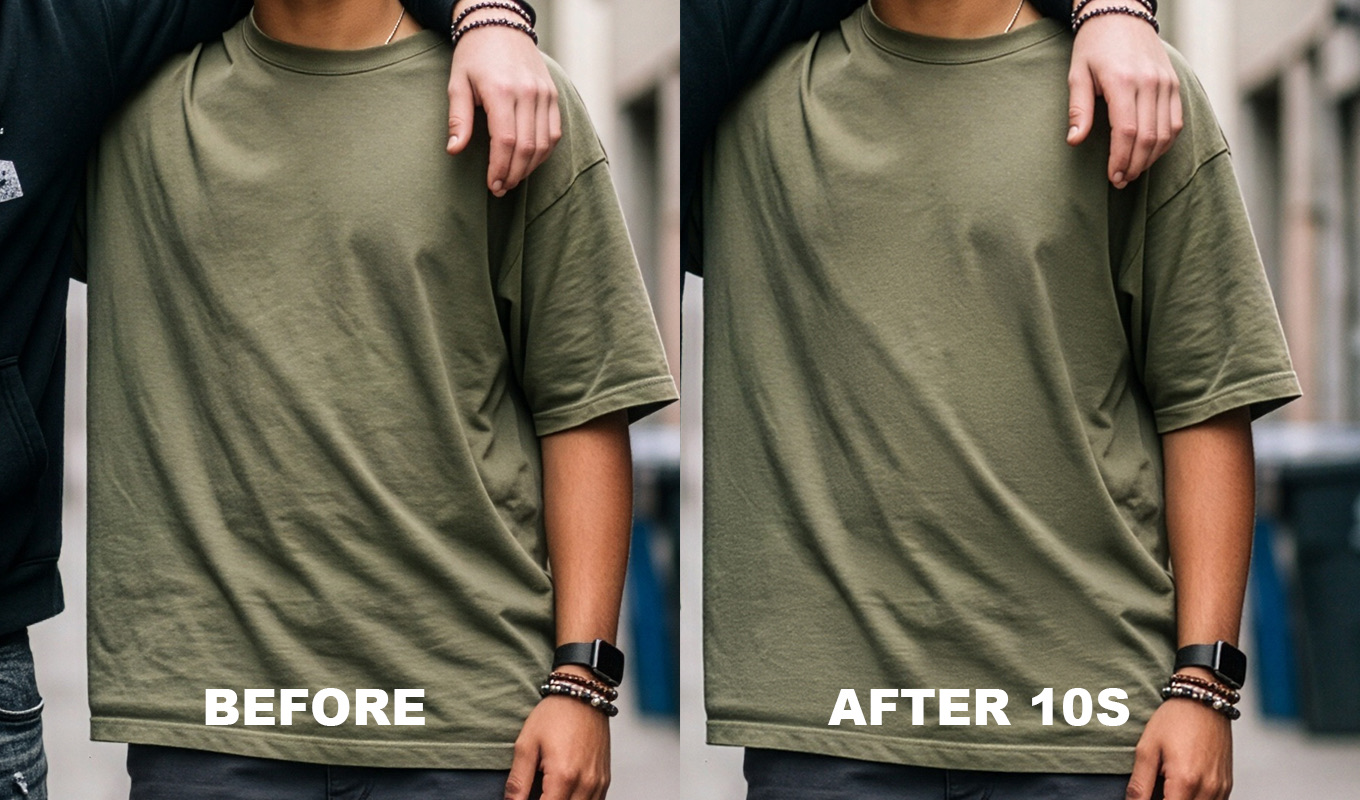
Can AI remove wrinkles from clothes? Yes, and often in seconds. The better question is what it changes on the way. This is an honest comparison of the AI options against doing it in Photoshop yourself, for photographers and for sellers.
One thing up front: I make Iron Pro, so weigh that. Iron Pro is a Photoshop plugin and it is not AI. I will be clear about where the AI tools are the better choice, because for some jobs they are.
How AI and Photoshop Differ
A filter based method, like frequency separation or Iron Pro, works with the pixels already in your photo. It evens out the light and shadow of the crease and keeps the existing weave. Nothing new is drawn.
An AI wrinkle remover predicts what smooth fabric should look like and redraws that area. When it guesses well, the result is clean and fast. When it guesses badly, it invents fabric: a slightly different weave, a softer collar, a button that moved. That is the core trade off. AI gives you speed, Photoshop gives you the original garment.
The Options Side by Side
| TOOL | HOW IT WORKS | COST | WATCH OUT FOR |
|---|---|---|---|
| Photoroom | AI, phone and web, Ironing tool | Paid Pro tiers | Upload, little texture control |
| Evoto | AI editor with clothing wrinkle removal | Credits, about $0.06 to $0.11 each on annual plans, plans from about $90/year | Cost per exported photo |
| Phone and web apps (Pixelcut and similar) | AI, one tap | Around $10/month or a few cents per photo | Upload, texture often smeared |
| Photoshop Generative Fill | AI, built into Photoshop | Uses generative credits | Can invent fabric that changes the garment |
| Retouch4me Fabric | AI plugin, runs on your computer | $124 one-time list price (often discounted, also seen at $145) | Automatic, less say over where it works |
| Iron Pro | Not AI. Filter and layer setup, you paint where | Lifetime or monthly, Adobe Exchange | One photo at a time, avoid prints with the brush |
| Manual Photoshop | Healing, Patch, Clone, frequency separation | Included with Photoshop | Time and skill |
Prices checked November 2026, check current.
Where AI Wins
- Speed. One tap per photo. No layers, no masks, no learning curve.
- Volume. If you list dozens of items a day, an AI app or a cloud editor will get through the pile far faster than anyone retouching by hand.
- Phone workflows. For a Vinted or Depop listing shot on a phone, an app on the same phone is the most practical route. More on that in removing wrinkles from clothes in product photos.
- No skill needed. If you do not use Photoshop, AI is the only fast option.
Where AI Fails
- It invents fabric. Because the area is redrawn, the weave, the stitching or the edge of a pocket can come back slightly different. For a client portrait that may not matter. For a product photo, the buyer receives a garment that looks different from the picture.
- Prints, logos and text. Letters warp, a logo loses its shape, a check pattern stops lining up. This is the most common visible failure.
- Hands, hair and edges. Where the fabric meets skin or hair, AI tools sometimes blend the two.
- Privacy and uploads. Phone and web apps, and Generative Fill, process your photo on a server. For client portraits, unreleased products or work under an agreement with a brand, that can be a problem. Local tools keep the file on your computer.
- Per photo cost. Credits look cheap per image, but they add up over a year of shoots, and you pay again for every re-export.
- Different result every run. Generative Fill gives you variations. That is useful for exploring, and a problem when you need the same look across a catalog.
Iron Pro: the wrinkle remover for Photoshop
One click builds the setup, then you paint over the wrinkles. Clothes and backdrops smooth out, the fabric keeps its texture, and every slider stays adjustable.
GET IRON PRO →“I used to spend so much time fixing little wrinkles in clothes. Now I can focus on making my photos beautiful instead of worrying about every tiny crease.”
“I'm a photographer, not a dry cleaner! I swear every photoshoot has at least one wrinkled shirt, dress or pair of trousers. This tool will save me in fashion weeks for suuure!”
“Wedding dresses are beautiful, but after hours of walking, sitting, hugging and dancing, they can become a retouching nightmare. This has made my workflow so much easier.”
“I swear clothes always look more wrinkled in photos than they do in real life. A few brush strokes and the clothes look so much better!”
“I used to spend so much time fixing little wrinkles in clothes. Now I can focus on making my photos beautiful instead of worrying about every tiny crease.”
“I'm a photographer, not a dry cleaner! I swear every photoshoot has at least one wrinkled shirt, dress or pair of trousers. This tool will save me in fashion weeks for suuure!”
“Wedding dresses are beautiful, but after hours of walking, sitting, hugging and dancing, they can become a retouching nightmare. This has made my workflow so much easier.”
“I swear clothes always look more wrinkled in photos than they do in real life. A few brush strokes and the clothes look so much better!”
How to Check an AI Result
If you do use an AI tool, check every image before it goes out. Put the before and after on two layers and toggle between them at 100 percent. Look at four places: the collar and cuffs, any print or logo, the buttons and stitching, and the edge where fabric meets skin or hair. If something moved, mask the AI layer back to the original in that area. On a product photo, compare the colour with the real garment too. A minute of checking is cheaper than a returned order or an unhappy client.
Doing It by Hand in Photoshop
The manual method is slower, but nothing is invented, and it works on any photo:
- Duplicate the layer (Cmd/Ctrl+J).
- Remove small creases with the Spot Healing Brush (J), set to Content-Aware.
- Patch medium creases from clean fabric nearby with the Patch Tool.
- Clone along seams and edges with the Clone Stamp (S).
- Smooth large folds with frequency separation, using a much bigger blur radius than for skin. Settings: frequency separation for clothes.
The full walkthrough with every tool is in the main guide: how to remove wrinkles from clothes in Photoshop. If you need a press-it-flat result on a single shirt, there is also how to iron a shirt in Photoshop.
Remove Wrinkles With Photoshop AI
Photoshop has its own AI tools, and they are worth knowing for small areas. Generative Fill: select one crease loosely with the Lasso, click Generative Fill in the contextual task bar, leave the prompt empty or type something plain like smooth fabric, and pick the best of the variations. It works well on a single fold on plain fabric. On a large area or a print, check closely, because it can change the garment. The Remove Tool (in the Spot Healing Brush group) is also useful for one short crease line. Generative Fill runs on Adobe's servers and uses generative credits.
Free and Online Options
People often search for a way to remove clothes wrinkles in Photoshop online for free. There is no free full Photoshop, but free browser editors like Photopea copy the Photoshop layout, with layers, blend modes and healing tools, so the manual method above works there. Free tiers of phone apps exist too. Check the export limits and what happens to your uploaded photos before you rely on them.
Lightroom users can soften creases with masks and negative Texture, but without layers there is no real frequency separation: removing wrinkles from clothes in Lightroom.
Which Should You Use?
- Many product photos every day, shot on a phone: an AI app. Speed matters most and the garment is plain.
- Hundreds of items a week, no time to edit: an editing service at about $1 per image, or a cloud AI editor.
- Client portraits, headshots, weddings: Photoshop, on your computer, with control over where the smoothing goes. Manual, or a plugin like Iron Pro if you want it faster.
- One small crease right now: Spot Healing, the Remove Tool or Generative Fill.
- Prints, logos, lace: careful cloning by hand. Neither AI nor smoothing filters handle these well.
A ranked list of the plugins, with prices, is in best wrinkle remover plugins for Photoshop.
Iron Pro: the wrinkle remover for Photoshop
One click builds the setup, then you paint over the wrinkles. Clothes and backdrops smooth out, the fabric keeps its texture, and every slider stays adjustable.
GET IRON PRO →AI is the right answer when speed and volume matter more than the exact fabric. When the garment has to stay the garment, keep the pixels you shot and smooth them yourself.
Frequently Asked Questions
Can AI remove wrinkles from clothes?
Yes. Apps like Photoroom, editors like Evoto and Photoshop Generative Fill can remove wrinkles in seconds. Because they redraw the area, they can also change the weave, stitching, prints or logos, so check the result closely.
What is the best AI clothes wrinkle remover?
It depends on the job. Phone apps suit sellers shooting on a phone, Evoto suits photographers who already edit there, Retouch4me Fabric runs inside Photoshop on your computer, and Generative Fill is handy for one small area.
Can I remove clothes wrinkles in Photoshop online for free?
There is no free full Photoshop, but free browser editors like Photopea have layers, blend modes and healing tools, so the manual healing and frequency separation method works there.
Does Photoshop have AI to remove wrinkles from clothes?
Yes. Generative Fill and the Remove Tool are AI based and work well on single creases on plain fabric. Generative Fill runs on Adobe servers, uses generative credits and can change the garment on large areas or prints.
Is AI or manual editing better for clothing wrinkles?
AI is better for speed and high volume. Manual editing in Photoshop is better when the fabric, prints and logos must stay exactly as shot, or when photos should not be uploaded.