Best Shine Remover Plugins for Photoshop
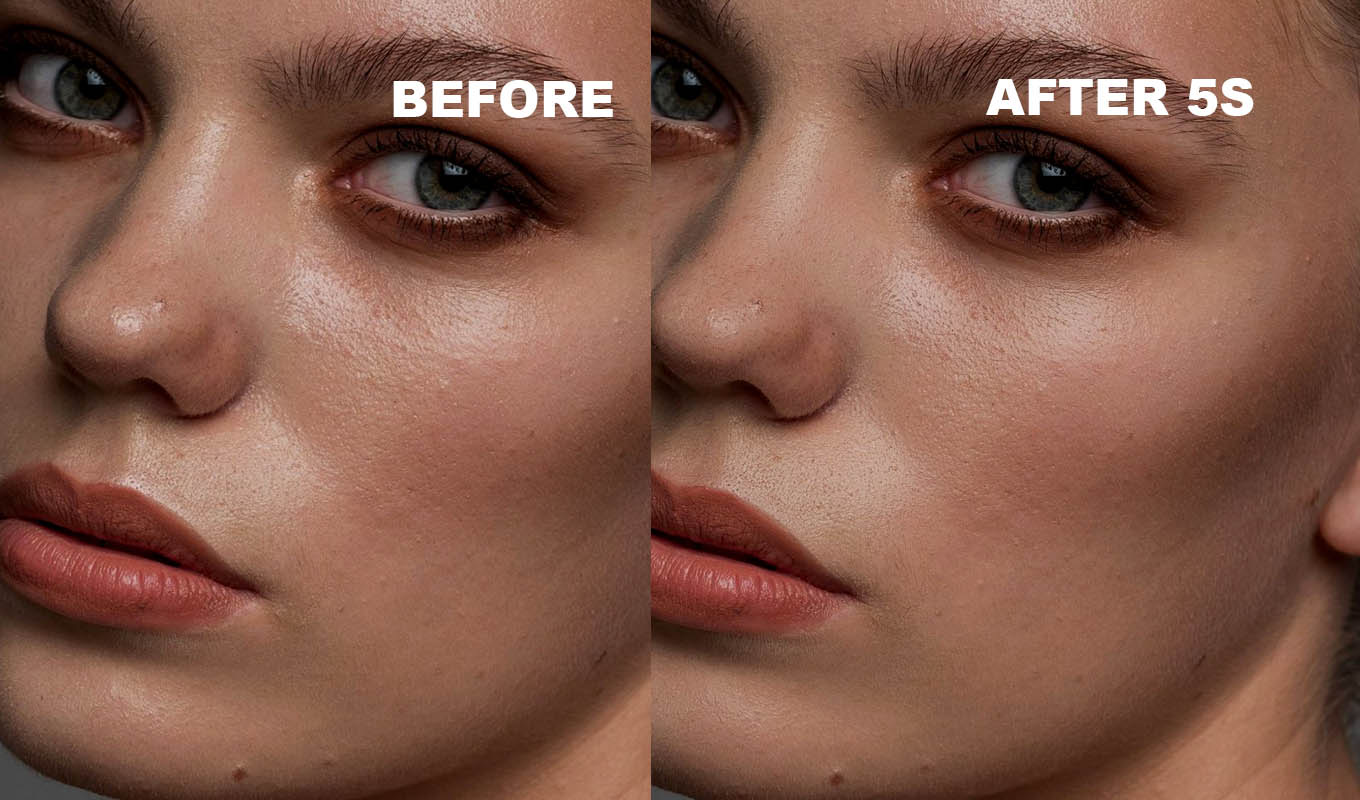
A shine remover plugin for Photoshop has one job: take the greasy hot spots off a forehead, nose and chin, and leave the skin looking like skin. There are only a handful of real options. Some are dedicated plugins, some are one slider inside a bigger skin tool, and one is free and already in Photoshop. Here they are ranked, with honest pros, cons and prices.
Disclosure first: I make Matte Pro, so weigh that. It is number one on my list because it does what I wanted for my own headshots. I have tried to be fair to the others, and for some jobs they are the better pick. If you want to learn the method without buying anything, start with how to remove shine from a face in Photoshop.
The Free Method First
Every good shine tool copies the same idea, so it helps to know it. Shine is skin that is brighter than the skin next to it. Darken only that, and leave the rest.
- Add an empty layer above the photo and set its blend mode to Darken.
- Pick a soft Brush (B) at 10 to 20% opacity.
- Alt/Option click on clean skin right next to the shine to sample its color.
- Paint over the shine in light passes, and sample again as the skin color changes.
Darken mode only shows your color where the photo is brighter than it, so the pores stay and the surrounding skin is not touched. It costs nothing and takes a few minutes per face. More free options, including a Curves trick and tools that work without Photoshop: free ways to remove shine from a face.
What I Looked At
- Control: can you choose where the shine goes, and how much stays?
- Texture: do the pores survive, or does the skin go flat?
- Where it runs: a Photoshop panel, a separate editor, or the cloud.
- Price model: one-time, subscription or pay per photo.
- Scope: a dedicated shine tool, or one slider in a bigger app.
The Ranking, November 2026
Brush-based Photoshop plugin from the makers of RetouchLab Skin Pro, built on the Darken method above. Not AI: it builds a smoothed color layer in Darken mode with a black mask, plus layers that bring the skin detail back. You press REMOVE SHINE and paint white over the shiny skin. Only the spots brighter than the skin around them are toned down, and the pores stay. Pros: you decide where, live Matte Amount, Skin Detail and New Texture sliders, + NEW ZONE for face and body at different settings, works offline. Cons: one photo at a time, not batch; it flattens the file and converts it to 8-bit, so work on a copy; set Shine Size before you press the button.
A dedicated shine plugin from Retouch4me, sold as one of their AI plugins with a perpetual license. Their page says it finds shiny areas automatically and works on group photos without selecting faces. There is a free demo for Mac and Windows, and a Cloud Retouch option at $0.10 per photo. Pros: fully automatic, good for flash, studio and night shots, one-time price. Cons: the software decides where, so you may need to mask the result back where you wanted a highlight to stay.
Retouch4me's cloud based all-in-one tool. Its skin section includes Mattifier, next to their heal, dodge and burn and skin tone tools, and their page says the annual plan includes Apex and the full AI plugin set. 20 free credits after you register. Pros: shine plus the rest of a skin retouch in one place. Cons: it needs an internet connection to process, and it is a yearly plan rather than a one-time buy.
A skin smoothing plugin from Digital Anarchy for Photoshop and Lightroom with a Shine Reduction slider. It builds a skin mask automatically, and the trial is fully working with a watermark. Pros: shine and smoothing in one panel, a one-time price. Cons: shine is one slider inside a smoothing tool, so it works on the whole skin mask rather than the spots you choose.
A full photo editor from Skylum that also works as a plug-in for Photoshop. Its Skin AI tool has a Shine Removal slider. Prices were shown to me in euros against a much higher list price, so check yours. Pros: one slider, fast, and you get a whole editor. Cons: a big app to buy for one job, and the slider works on the face as a whole.
An AI editor with a Reduce Face Shine slider in its portrait retouching tools. You pay per exported photo with credits, about 0.05 to 0.09 EUR per credit on annual plans when I checked, with a 7-day trial. Evoto's own guide warns that high values can look matte and unnatural, especially under studio light. Pros: strong for volume and batch work. Cons: a separate editor, not a Photoshop panel, and the cost grows with every export.
A Darken layer, the Clone Stamp or Healing Brush in Darken mode, Curves on a mask, or frequency separation. Pros: free with Photoshop, nothing invented, total control. Cons: slow on a full gallery, and the result depends on how light your hand is.
Prices checked November 2026, check current. Adobe Exchange shows Matte Pro in your local currency.
| TOOL | AI? | RUNS | WHO DECIDES WHERE |
|---|---|---|---|
| Matte Pro | No | Photoshop, offline | You, with a brush |
| Retouch4me Mattifier | Yes | Plugin download, or cloud per photo | The software |
| Retouch4me Apex | Yes | Cloud | The software |
| Beauty Box Photo | Not stated | Photoshop, Lightroom | Auto skin mask |
| Luminar Neo Skin AI | Yes | Editor or Photoshop plug-in | One slider |
| Evoto | Yes | Separate editor | One slider |
| Built-in tools | No | Photoshop | You, by hand |
Matte Pro: remove shine from skin in Photoshop
One click builds the setup, then you paint over the shiny skin. Only the spots brighter than the skin around them are toned down, and the pores stay.
GET MATTE PRO →“I love natural skin retouching, and this makes it so easy to get rid of unwanted shine without losing that beautiful skin texture. Exactly what I've been looking for!”
“I used to spend so much time fixing skin manually. Now I just grab the brush and go over the areas that need it. Such a small thing, but it makes my editing so much easier!”
“Summer weddings are beautiful until you open the portraits and realise everyone is glowing a little TOO much. This has saved me so much time fixing shiny foreheads and cheeks.”
“One of those little Photoshop tools that makes a surprisingly big difference. I used to spend time manually reducing shiny spots with different techniques. Now I can do it in seconds.”
“I love natural skin retouching, and this makes it so easy to get rid of unwanted shine without losing that beautiful skin texture. Exactly what I've been looking for!”
“I used to spend so much time fixing skin manually. Now I just grab the brush and go over the areas that need it. Such a small thing, but it makes my editing so much easier!”
“Summer weddings are beautiful until you open the portraits and realise everyone is glowing a little TOO much. This has saved me so much time fixing shiny foreheads and cheeks.”
“One of those little Photoshop tools that makes a surprisingly big difference. I used to spend time manually reducing shiny spots with different techniques. Now I can do it in seconds.”
A Retouch4me Mattifier Alternative
Mattifier is a good tool if you want shine handled with no input at all, for example on a big batch of flash photos. People look for an alternative for a few reasons:
- They want to keep some highlight. A face with zero shine looks flat. On a portrait you often want the forehead fixed but the glow on the cheekbone left alone.
- They prefer no AI, so nothing in the skin is redrawn.
- Price model. Some prefer monthly, some a one-time buy, some do not want a yearly plan.
The alternatives, honestly:
- Matte Pro (ours). Brush and mask control, Darken based, not AI, lifetime or monthly.
- Beauty Box Photo, if you also want skin smoothing in the same panel.
- Evoto, if you already edit there and work at volume.
- The free Darken layer, if you have more time than budget.
What None of Them Do
A few jobs stay manual whichever tool you pick. A spot that is fully blown out, pure white with no skin detail left, has nothing to darken; it needs the Clone Stamp to bring texture in from nearby. The highlights in the eyes and on the lips are what make them look alive, so keep every tool away from them. Sweat drops and wet patches on clothes are a different job too, see how to remove sweat in Photoshop. And blotting papers and a softer, bigger light on set still beat every tool on this list.
Which One Should You Pick?
- Headshots and portraits where you want control: Matte Pro, or the free Darken layer.
- Fully automatic, one-time price: Retouch4me Mattifier.
- Shine plus a full skin retouch in the cloud: Retouch4me Apex.
- Shine and smoothing in one panel: Beauty Box Photo.
- High volume, batch: Evoto.
- You edit in Lightroom: a brush mask with a luminance range, see removing shine in Lightroom.
Matte Pro: remove shine from skin in Photoshop
One click builds the setup, then you paint over the shiny skin. Only the spots brighter than the skin around them are toned down, and the pores stay.
GET MATTE PRO →Every tool on this list removes shine. The difference is who decides where, and how much highlight is left. Leave a little: a face needs some light on it to look real.
Frequently Asked Questions
What is the best plugin to remove shine in Photoshop?
It depends on how much control you want. Matte Pro lets you paint where the shine goes and is not AI. Retouch4me Mattifier is fully automatic. Beauty Box Photo, Luminar Neo and Evoto have a shine slider inside a bigger skin tool. The free Darken layer method works in any version of Photoshop.
Is there a free shine remover for Photoshop?
Yes, the tools are already in Photoshop. Paint skin color on an empty layer set to Darken, or use the Clone Stamp or Healing Brush in Darken mode. It takes a few minutes per face and keeps the pores.
What is a good Retouch4me Mattifier alternative?
Matte Pro if you want to paint exactly where the shine is removed without AI, Beauty Box Photo if you also want smoothing, Evoto for high volume, and the free Darken layer method if you have the time.
How much does Retouch4me Mattifier cost?
Its page showed $145 with a sale price of $94.25 when checked in November 2026, plus a cloud option at $0.10 per photo. Check the current price on their site.
Which shine remover plugins do not use AI?
Matte Pro is filter and layer based and works offline. Photoshop's own Darken layer, Clone Stamp, Healing Brush and frequency separation are not generative either. Retouch4me, Luminar Neo Skin AI and Evoto are AI based.