7 Best Photoshop Retouch Plugins for Skin Retouching in 2026 (Tested & Ranked)
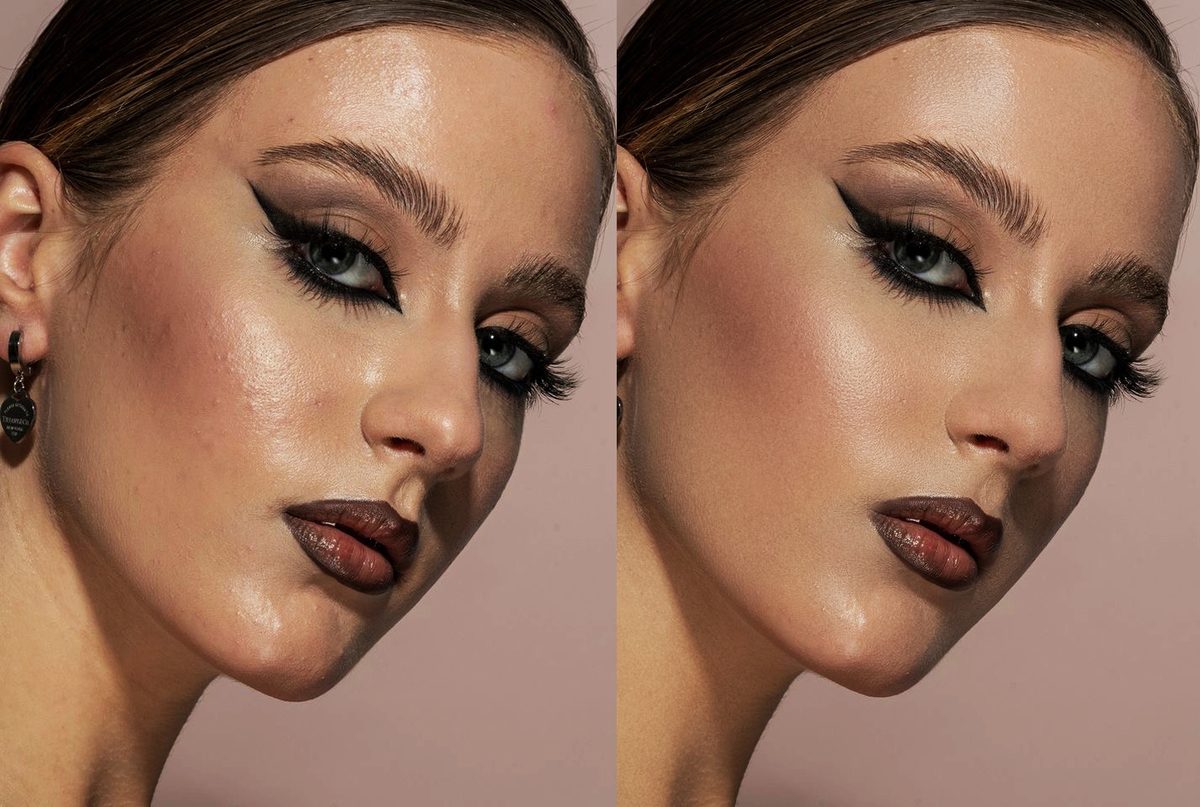
I'm a portrait photographer shooting 10–15 sessions per week. Last summer I burned out from spending 6+ hours every single day on retouching. So I tested every major Photoshop plugin on the market — and built my own when none of them worked the way I needed.
This is an honest, no-affiliate-BS breakdown of the 7 plugins I tested. The ranking is based on three things only: speed, natural results, and price-to-value.
Don't want to read all 7? Here's the short answer.
RetouchLab Skin Pro — €39 for 6 months, or €79 lifetime.
✓ No subscription · ✓ 5.0 on Adobe Exchange · ✓ Free 3-day trial if you want to test first
Looking for a free download instead? Honest answer: here is what is genuinely free for skin retouching (and which "free download" sites to avoid).
What Makes a Good Skin Retouching Plugin?
Looking for a free option first? See what's genuinely free for skin retouching — and what "free download" sites really are. Most Photoshop retouching plugins promise the same thing — fewer hours in front of the screen — but they take very different roads to get there. The best skin retouch plugin for Photoshop does three things:
- Save time — under 1 minute per photo, not 30 minutes
- Preserve natural skin texture — real pores, not plastic
- Give you control — you decide where, you decide how much
Most plugins do one or two. Only RetouchLab does all three.
Curious how it's done by hand? Here's the full frequency separation in Photoshop tutorial and the frequency separation vs dodge & burn breakdown.
This roundup covers Photoshop plugins. If you also want standalone apps, see our guide to the best skin retouching software for photographers.
The Rankings
The only brush-based plugin that combines frequency separation, dodge & burn, and tone evening in a single tool. You paint exactly where you want to retouch, adjust 7 parameters in real time, and the result is professional in under a minute.
Built by a portrait photographer (me) after burning out from manual retouching. The skin texture stays real — pores visible, natural finish, no plastic look. Works on every skin type, lighting condition, and editing style.
Try RetouchLab Skin Pro
Frequency separation + dodge & burn + tone evening. 7 parameters. Brush-based control. Real-time preview. Professional results in 30 seconds.
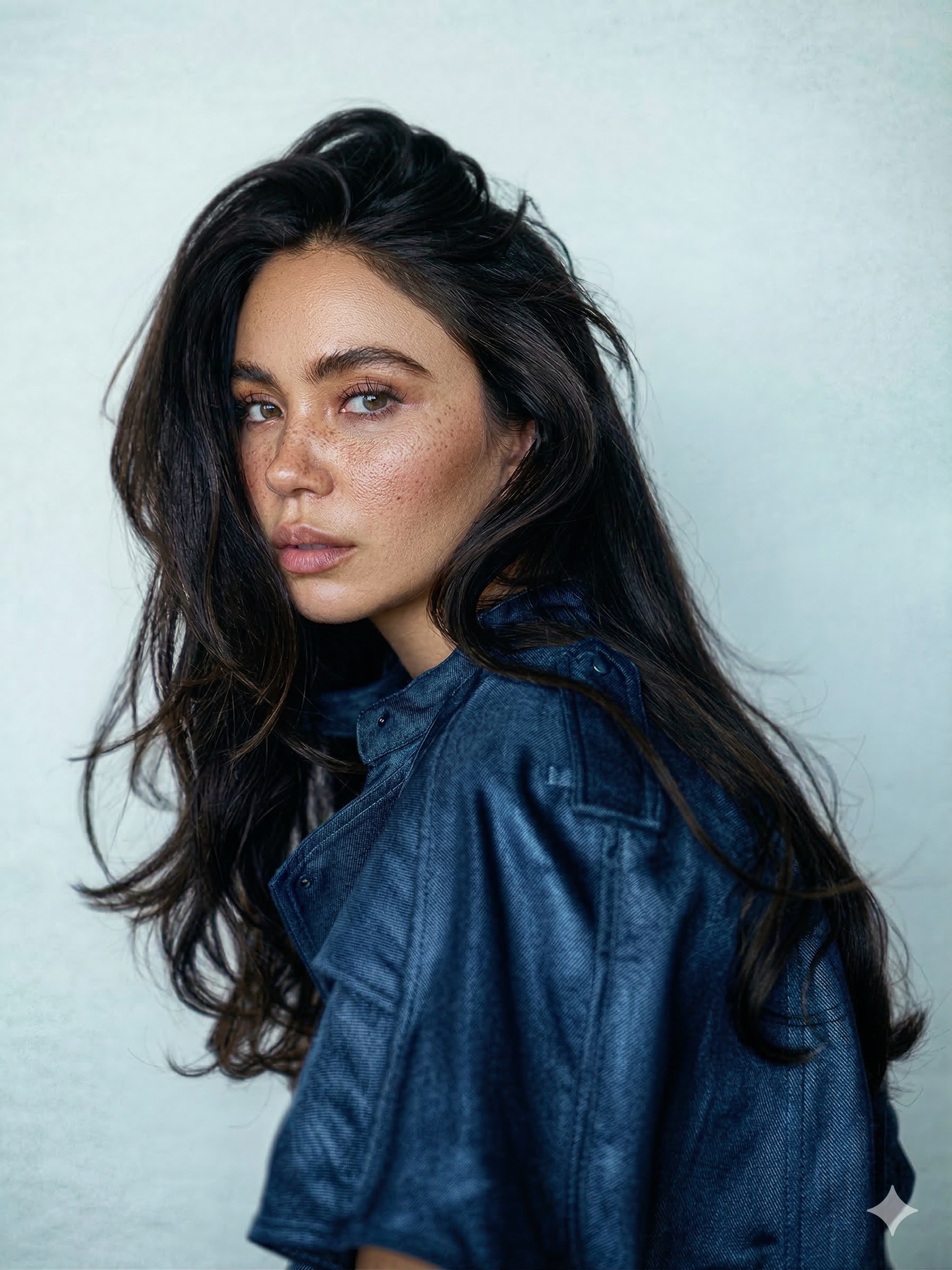 BEFORE
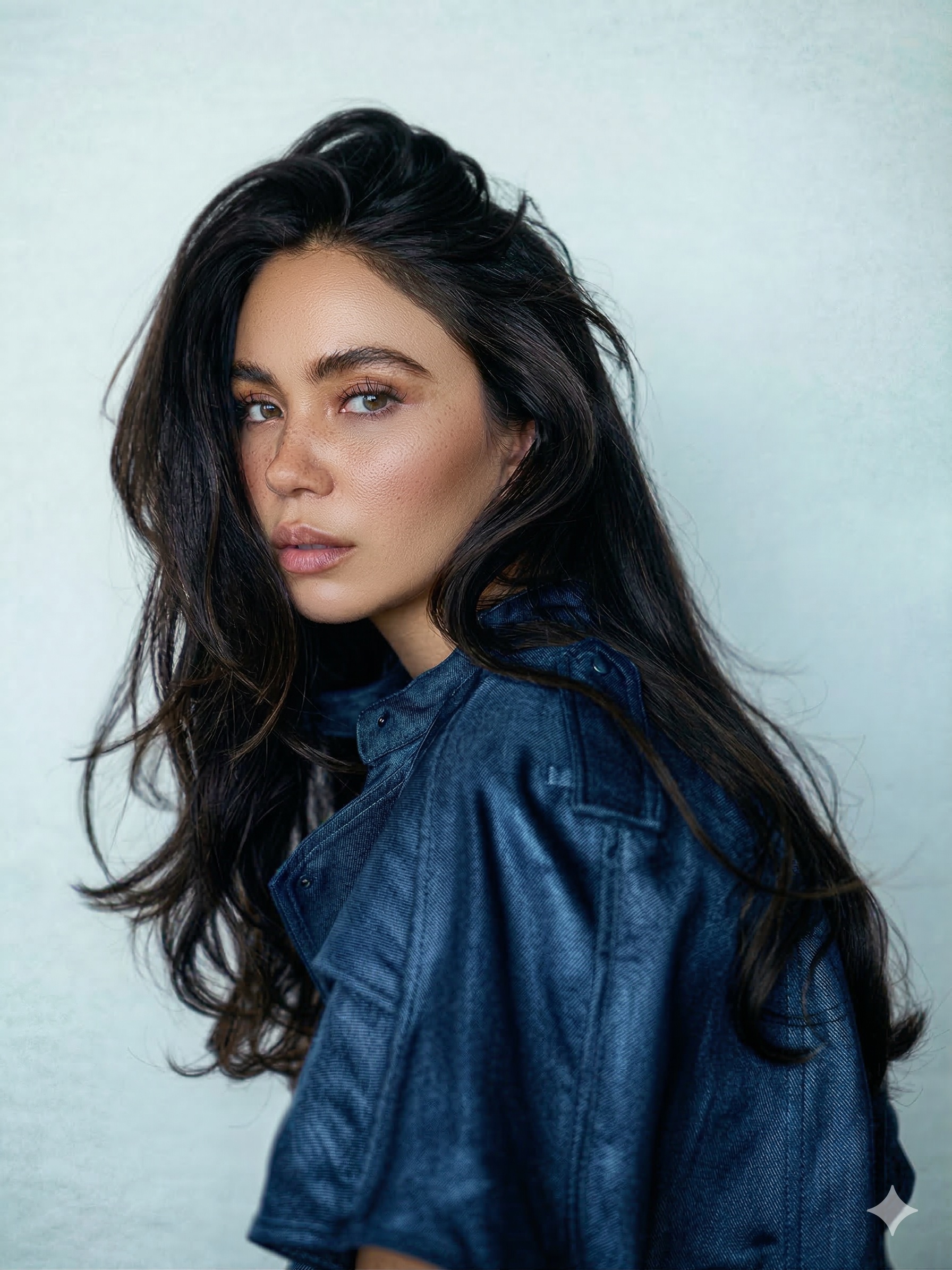 AFTER · 52 SECONDS
AI-powered automatic retouching. The technology is impressive — but you have zero control over where or how much it retouches. To get a workflow equivalent to RetouchLab, you buy its photo plugin bundle, which starts at $145, or subscribe from $169 a year. And the results often look over-processed because AI decides everything.
One of the oldest established skin retouching plugins. Uses sliders for smoothing, texture, and tone masking. Decent for high-volume work, but the results are fully automatic and often look over-processed on close-up portraits. No brush-based control — you can't paint exactly where you want.
Designed for full face makeovers — it reshapes features, smooths skin, adds digital makeup. Not for photographers who want subtle, natural retouching. Results look heavily processed and clients always notice when their face is "different." Good only for fashion/beauty shots where heavy editing is expected.
Standalone AI app (not a true Photoshop plugin). Per-face retouching is impressive, but you're locked into their ecosystem and pay per image. Costs add up fast for high-volume work. Not part of your normal Photoshop workflow.
Full photo editor with AI portrait features. More for hobbyists than working photographers. The "Skin AI" tool smooths but loses texture. Better as a standalone editor than a portrait retouching tool.
Free with your Photoshop subscription. Smart Portrait does some smoothing and skin tweaks. Limited control, requires cloud processing, results are inconsistent. Worth trying since it's free, but not a replacement for a real retouching tool.
Quick Comparison Table
The Bottom Line
If you're a portrait, wedding, or event photographer who wants fast, professional, natural-looking skin retouching — RetouchLab Skin Pro is the only sensible choice in 2026.
It's the only plugin that gives you brush-based control + professional techniques (frequency separation, dodge & burn, tone evening) at a price that pays for itself in one wedding session.
Everything else either costs more over time (Retouch4me from $145, or $169 a year, vs €79 once), gives you no control (PortraitPro, Portraiture), or destroys natural skin texture.
The Only Sensible Choice in 2026
Brush control + frequency separation + dodge & burn + tone evening in one tool — €79 lifetime, pays for itself in a single wedding.
What Photographers Are Saying
Get Your Evenings Back
Retouch a full gallery in the time it used to take for one photo. Professional, natural skin in 30 seconds.
GET SKIN PRO — €39 →Compare RetouchLab vs Every Major Tool
Want the one-on-one breakdowns? We tested RetouchLab against every major Photoshop retouching plugin, honestly: vs Retouch4me, vs Evoto, vs PortraitPro, vs Imagenomic Portraiture, vs Luminar Neo, vs Aftershoot, vs Topaz Photo AI, vs SkinFiner, vs Beauty Box, vs Perfectly Clear, and vs the free Neural Filters.
Frequently Asked Questions
How is RetouchLab different from Retouch4me?
RetouchLab is brush-based — you decide where to retouch. Retouch4me is fully AI-driven — it decides for you. Also, RetouchLab is one tool with all techniques. Retouch4me splits the work across separate plugins, sold as a bundle from $145 or on a yearly plan from $169.
Does it work in Photoshop on Mac and Windows?
Yes. Works in Photoshop 24+ on both Mac and Windows. Installs as a panel inside Photoshop.
Will it damage my Photoshop or files?
No. RetouchLab is non-destructive — it works on layers above your original image. You can always undo or remove it. It's distributed through Adobe Exchange (Adobe's official plugin marketplace).
Can I try it before buying?
Yes. There's no subscription — just two one-time options: €39 for 6 months or €79 lifetime.
I'm a beginner — will I be able to use it?
Yes. That's actually who it's built for. You don't need to know frequency separation or dodge & burn — the plugin handles the technique, you just paint where you want it applied. Most photographers are productive within 5 minutes.
What is the best Photoshop retouch plugin?
For skin, RetouchLab Skin Pro — it combines frequency separation, dodge & burn, and tone evening into one brush, keeps real texture, and is €79 lifetime (one-time). It's the best Photoshop retouch plugin for fast, natural skin work.
Is there a free retouch plugin for Photoshop?
There's no truly free professional retouch plugin, but RetouchLab is €39 for 6 months or €79 lifetime — one-time, no subscription.
What's the best retouch plugin for Photoshop for beginners?
RetouchLab. You don't need to know frequency separation or dodge & burn — the plugin handles the technique and you just brush where you want it. Most photographers are productive within 5 minutes.
Stop Wasting Hours on Retouching
Frequency separation. Dodge & burn. Tone evening. Brush control. Real-time preview. Professional results in 30 seconds. Built by a working portrait photographer for working portrait photographers.
Want to see how it compares head-to-head? Read RetouchLab vs Retouch4me · vs PortraitPro · vs Evoto · vs Luminar Neo
Looking for the best portrait retouching plugin for Photoshop? See our full guide.