How to Fix Banding in Lightroom
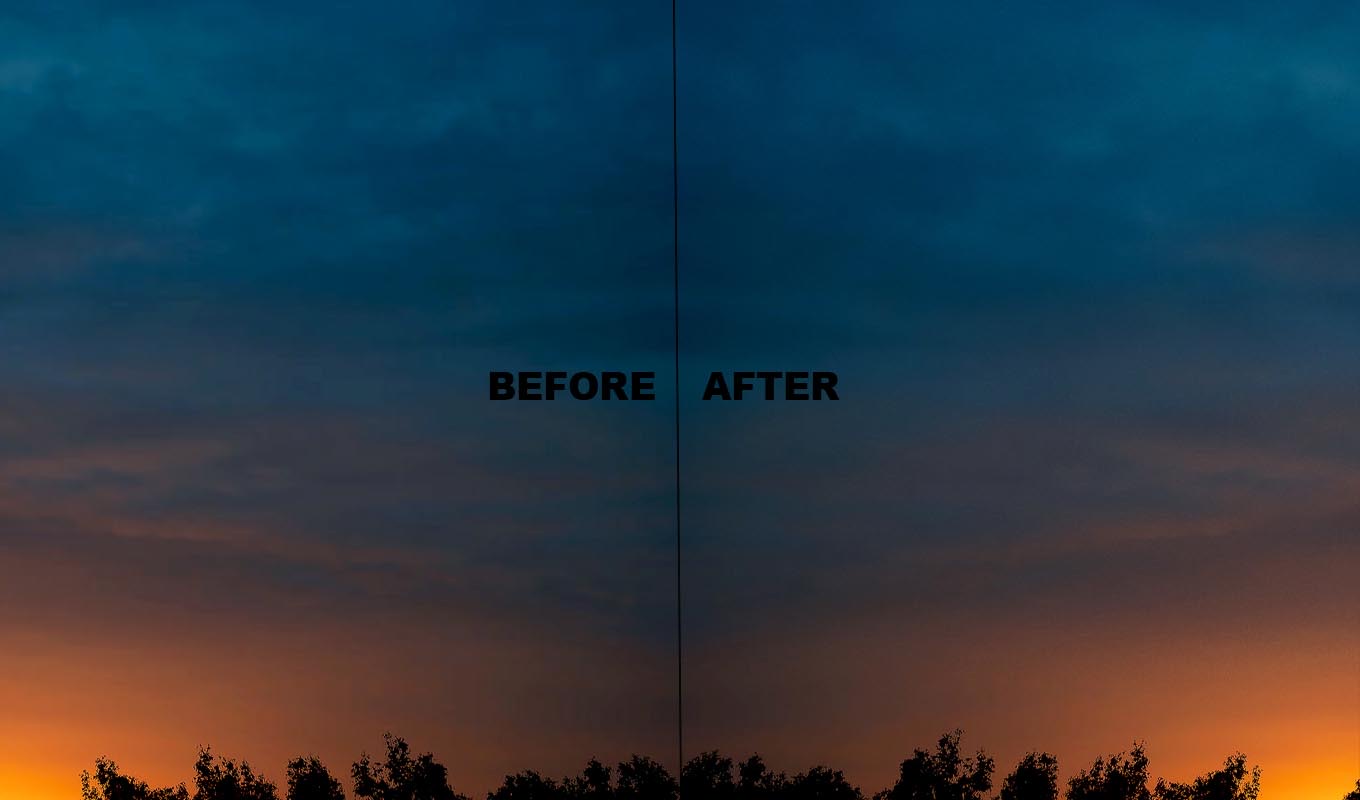
Lightroom edits RAW files with a lot of tonal room, so a banded sky is often a surprise. It looks fine in the Develop module, then the exported JPEG has stripes. Or a JPEG from a phone already had stripes and every slider makes them worse. Here is where banding comes from in a Lightroom workflow and how far you can fix it there.
Where the Banding Comes From
- The edit. Strong Dehaze, Clarity, Contrast or Saturation on a smooth sky stretches its tones apart. A sky mask with a big push does the same.
- The export. A JPEG is always 8-bit. Smooth gradients that looked perfect in Lightroom can step when they are squeezed into 8 bits, especially at a low quality setting.
- The source. If you start from a JPEG or a phone photo, the banding may already be there. Lightroom cannot add tones the file does not have.
- The screen. Some monitors show banding on any gradient. Compare on another display before you change your edit.
Step 1: Edit the Sky Gently
Go back to the sky and check which adjustment brought the stripes. Toggle each mask and panel on and off. In my experience Dehaze is the most common one, followed by Saturation and a strong Highlights pull.
- Lower the strongest adjustment and see if the stripes calm down.
- Use two softer masks instead of one strong one, for example a Linear Gradient for the top of the sky and Select Sky for the rest.
- Keep color changes small. Big hue shifts on a sunset band faster than brightness changes.
Step 2: Add Grain
In the Effects panel, add a small amount of Grain with a small Size. Grain breaks up the edge of each band, so your eye cannot follow the stripe. It applies to the whole photo, so keep it low and check the face or the subject at 100% too.
Deband Pro: fix banding in Photoshop with a brush
One click switches the photo to 16-bit and builds the fix, then you paint over the stripes. The gradient smooths out and fine grain keeps the banding from coming back when you save.
GET DEBAND PRO →“I almost gave up on one of my favourite sunset photos because of horrible banding in the sky. This saved it! I'm genuinely so happy I found this tool.”
“This tool is now something I reach for immediately. I paint over the affected areas and the difference is incredible!”
“I was THIS close to deleting an image because the sky looked terrible. I decided to give this plugin a try, and wow. It saved an image I thought was beyond fixing.”
“I shoot a lot of sunsets and skies, and banding has always been one of those annoying things that can ruin an otherwise perfect image. A few brush strokes and the gradients look smooth again.”
“I almost gave up on one of my favourite sunset photos because of horrible banding in the sky. This saved it! I'm genuinely so happy I found this tool.”
“This tool is now something I reach for immediately. I paint over the affected areas and the difference is incredible!”
“I was THIS close to deleting an image because the sky looked terrible. I decided to give this plugin a try, and wow. It saved an image I thought was beyond fixing.”
“I shoot a lot of sunsets and skies, and banding has always been one of those annoying things that can ruin an otherwise perfect image. A few brush strokes and the gradients look smooth again.”
Step 3: Export the Right Way
- JPEG quality: use a high setting. Low quality is a common reason for stripes that were not in the preview.
- Color space: sRGB for the web. Exporting a wide color space JPEG and letting a browser or app convert it can make gradients worse.
- For further editing: export a 16-bit TIFF instead of a JPEG, and only make the JPEG at the very end.
When Lightroom Is Not Enough
If the banding is already in the file, from a JPEG or from earlier edits, Lightroom has no tool to smooth it. It has no blur and no layers. Grain hides mild steps. Wide, clear bands need a real blur on the sky, then noise on top.
Press Cmd/Ctrl+E to open the photo in Photoshop with your Lightroom edits. In Photoshop, switch to 16-bit, select the sky, blur it on a mask and add fine noise. The steps are in how to fix banding in Photoshop. Save, and the file comes back into your catalog.
I make Deband Pro, so weigh that. It is a Photoshop plugin that does that part in one click: 16-bit, a smoothing layer and a grain layer with a black mask, then you paint over the stripes. It does not run inside Lightroom, only in Photoshop.
Lightroom vs Photoshop for Banding
| SITUATION | LIGHTROOM | PHOTOSHOP |
|---|---|---|
| Stripes caused by your edit | Soften the edit, add Grain | Not needed |
| Stripes only in the export | Higher quality, sRGB, Grain | Not needed |
| Banding already in a JPEG | Grain hides mild steps only | Blur on a sky mask, then noise |
| Wide bands in a sunset | Hard to fix | Blur and noise, or Deband Pro |
Why skies band in the first place, and how to shoot so they do not: color banding in sky photos. Lightroom has the same no-layers limit with skin and fabric, see can you retouch skin in Lightroom.
Deband Pro: fix banding in Photoshop with a brush
One click switches the photo to 16-bit and builds the fix, then you paint over the stripes. The gradient smooths out and fine grain keeps the banding from coming back when you save.
GET DEBAND PRO →Frequently Asked Questions
How do I fix sky banding in Lightroom?
Lower the adjustment that caused it, usually Dehaze or Saturation on the sky, add a little Grain in the Effects panel and export the JPEG at high quality in sRGB. Banding that is already in the file needs a blur in Photoshop.
Why does my Lightroom export have banding?
JPEG is always 8-bit, so smooth gradients can step when exported, especially at low quality or after strong edits. Use a high quality setting, sRGB, and a little Grain.
Can Lightroom remove banding?
It can reduce banding caused by your own edits and hide mild steps with Grain. It has no blur or layers, so it cannot smooth wide bands that are already in the file.
Does Lightroom Grain help with banding?
Yes. A small amount of fine grain breaks up the edge of each band so it is much harder to see. Keep it low, because it affects the whole photo.