How to Get Wrinkles Out of a Backdrop
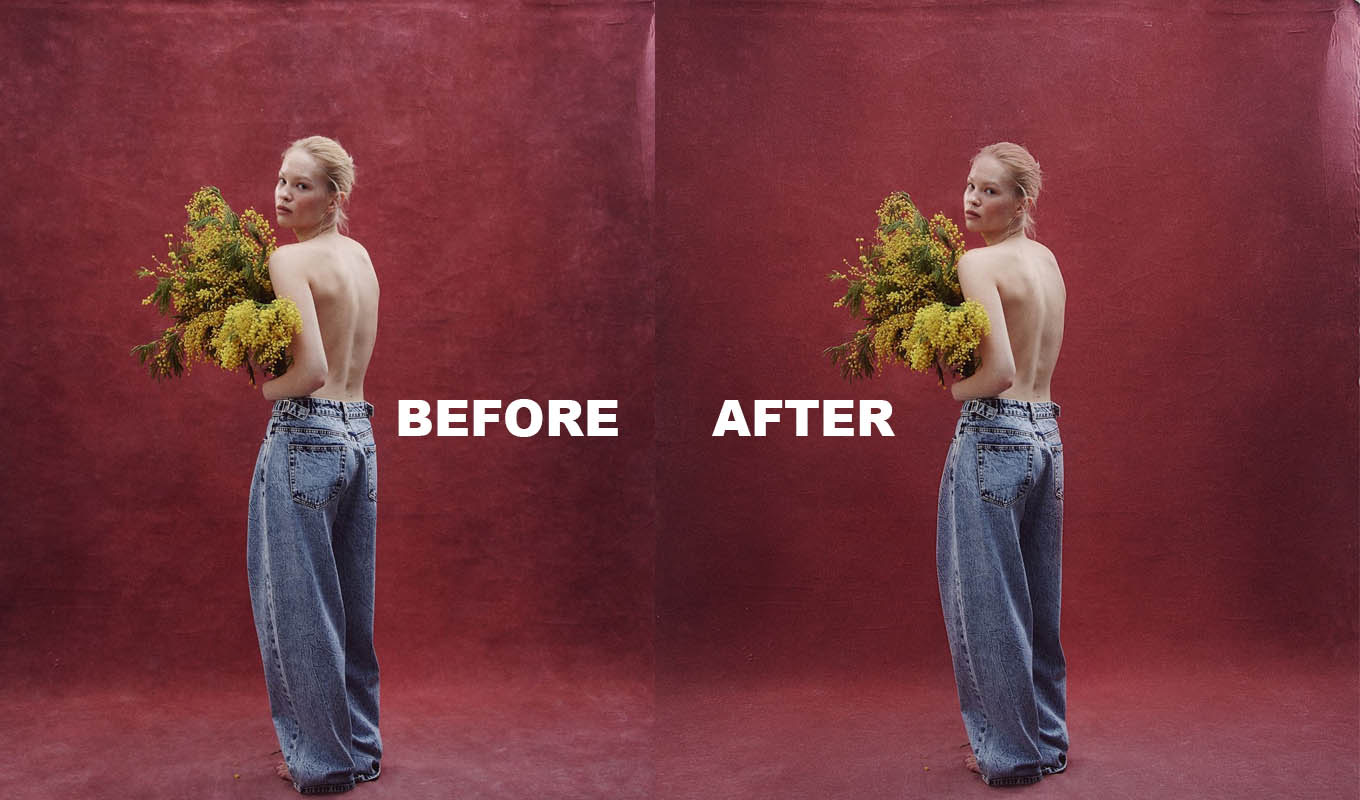
Every backdrop I own has arrived wrinkled at some point. Muslin comes folded in a bag, vinyl comes rolled too tight or folded in a box, paper gets dented the moment someone steps on it. The cheapest fix is always the one you do before the shoot, because ten minutes with a steamer saves an hour of retouching across a whole session.
Here is what works for each material, how to store backdrops so they stay flat, and what to do in Photoshop with the wrinkles you could not get out.
Muslin and Cloth Backdrops
Muslin and cotton canvas are the easiest to fix, and also the easiest to wrinkle again.
- Steam it hanging. Hang the backdrop on its stand and run a handheld garment steamer over it from top to bottom. Keep the steamer moving, a few centimetres from the fabric. Big storage folds take two or three passes.
- No steamer? Lightly mist the folds with water from a spray bottle and let it hang. The weight of damp fabric pulls many folds out as it dries. Do not soak a hand-painted backdrop, the paint can mark.
- Hang it the day before if you can. Gravity does a lot of the work overnight.
- A tumble dryer on low with a damp towel works for plain cotton muslin. Check the care label first. Painted and dyed backdrops can fade or crack.
Some photographers like a little texture in muslin. A few soft folds out of focus can look good. Long sharp storage creases never do.
Vinyl and Plastic Backdrops
Vinyl is the most stubborn. It is shiny, so every crease catches light, and it does not respond to steam the way fabric does.
- Unroll it in a warm room and lay it flat, face up, for a day. Put something heavy and flat on the creased parts, like books on a towel.
- Hang it with weight. Clip it to a stand and clamp a weight or a second pole to the bottom edge, so it hangs under tension.
- Gentle warmth only. Some people use a hair dryer on low from a distance to relax a crease. Never put a hot iron or a steamer right on vinyl. It can melt, shine or warp, and that damage is permanent.
- Roll, never fold. If it came folded, the fold lines may never fully go away. Roll it face out on a tube after the shoot.
Paper Rolls
Paper does not iron. A dent in paper is a dent. The fix is to pull down fresh paper for each session and cut off the dirty or dented part of the sweep. Clamp the roll so it does not roll back up and ripple. Ask people to take their shoes off, or put a piece of hardboard under the feet on a long session.
On Set: Hide What Is Left
- Move the subject away from the backdrop. More distance means a softer, more out of focus background, and soft folds blur on their own.
- Light it from the front. Side light rakes across folds and shows every ripple. Front light flattens them.
- Use a longer lens or a wider aperture to throw the backdrop further out of focus.
- On white, a little more light on the backdrop hides small wrinkles, as long as it does not wrap around the edges of the person.
Backdrop Pro: the backdrop wrinkle remover for Photoshop
One click builds the setup, then you paint over the backdrop. Wrinkles, creases and dust soften, grain is added back so the background does not band, and every slider stays adjustable.
GET BACKDROP PRO →“I can't explain how happy I am to spend less time fixing backdrops and more time enjoying photography. Something that used to take me ages now takes seconds. Such a relief!”
“I was genuinely surprised by how quickly this works. What used to take me several minutes now takes around 10-20 seconds. That's a huge difference when you're editing hundreds of images!”
“I'm extremely picky about my backgrounds. Even the tiniest crease drives me crazy once I open an image in Photoshop. A few strokes and my backdrop looks clean again. I'm obsessed!”
“I've tried different techniques for backdrop cleanup, but this is by far the fastest workflow I've found. The results are clean, and it takes seconds.”
“I can't explain how happy I am to spend less time fixing backdrops and more time enjoying photography. Something that used to take me ages now takes seconds. Such a relief!”
“I was genuinely surprised by how quickly this works. What used to take me several minutes now takes around 10-20 seconds. That's a huge difference when you're editing hundreds of images!”
“I'm extremely picky about my backgrounds. Even the tiniest crease drives me crazy once I open an image in Photoshop. A few strokes and my backdrop looks clean again. I'm obsessed!”
“I've tried different techniques for backdrop cleanup, but this is by far the fastest workflow I've found. The results are clean, and it takes seconds.”
Fixing Backdrop Wrinkles in Photoshop
Even after steaming, a few folds usually show in the final photos. In Photoshop the method is simple: blur a copy of the photo, mask it to the backdrop only, and add grain back.
- Press Cmd/Ctrl+J to duplicate the layer.
- On the copy, go to Filter > Noise > Median and raise the radius until the folds turn into soft tone.
- Hold Alt/Option and click the mask icon to add a black mask. Paint white over the wrinkled backdrop with a big soft brush.
- Stay away from hair and the edge of the person. Use Select > Subject and fill that area black on the mask.
- Add a 50% gray layer in Overlay mode with Filter > Noise > Add Noise at a low amount, so the smooth area matches the grain of the photo.
Dents in paper and footprints on the floor need the Patch Tool or Content-Aware Fill instead of blur. The full step by step, with the hair edge problem, is in how to remove wrinkles from a backdrop in Photoshop. If you edit in Lightroom only, see fixing a wrinkled backdrop in Lightroom.
Where Backdrop Pro Fits
I make Backdrop Pro, so weigh that. It does the Photoshop part above in one click: it builds the blur, texture and grain layers in a group with a black mask, and you paint over the backdrop. Blur Radius goes from 10 to 200 px for small marks up to big folds, and a little grain is on from the start so the smooth background does not band. It does not fix a dent or a torn sweep, and it is no replacement for steaming. It just makes the leftover folds quick.
Store Backdrops So They Stay Flat
| MATERIAL | STORE IT | BEFORE THE SHOOT |
|---|---|---|
| Muslin, cotton | Rolled, or loosely hung | Steam or mist and hang |
| Canvas, painted | Rolled face out on a tube | Hang early, steam gently |
| Vinyl | Rolled face out, never folded | Lay flat or hang with weight |
| Paper | On the roll, upright | Pull down fresh paper |
If the clothes in the photo are wrinkled too, the same layer idea works with a smaller radius. See how to remove wrinkles from clothes in Photoshop.
Backdrop Pro: the backdrop wrinkle remover for Photoshop
One click builds the setup, then you paint over the backdrop. Wrinkles, creases and dust soften, grain is added back so the background does not band, and every slider stays adjustable.
GET BACKDROP PRO →Frequently Asked Questions
How do you get wrinkles out of a vinyl backdrop?
Unroll it in a warm room and lay it flat with weight on the creases, or hang it with a weight clamped to the bottom edge. Gentle warmth from a hair dryer on low at a distance can help. Never use a hot iron or a steamer directly on vinyl.
Can you steam a muslin backdrop?
Yes. Hang it and move a garment steamer over it from top to bottom, a few centimetres away. Without a steamer, lightly mist the folds with water and let it hang to dry.
How do I store a backdrop so it does not wrinkle?
Roll it, face out, on a tube instead of folding it. Fabric can also hang loosely. Folding leaves crease lines, and on vinyl they may never fully go away.
How do I remove backdrop wrinkles in Photoshop?
Duplicate the layer, apply Filter > Noise > Median at a large radius, add a black mask and paint white over the backdrop only, away from hair. Then add a little noise back so the smoothed area matches the grain of the photo.